Documenting Regex with ASCII Art
1 |
|
Generating my own ASCII art in programming projects is a great way to solve certain hard problems. Diagrams made from PNGs with some kind of rendered documentation is great, but it has a high barrier to entry. Plus, this kind of documentation does not live with the code, which makes it easy to miss and forget about. I am going to start a series of posts detailing various strategies on how I draw with ASCII.
Regular Expressions
Regexes are quite difficult to maintain. They are dense, don’t break apart separately, and use a custom hard-to-learn language based off of funky characters. Almost every time that I encounter one in a code review, I take pause and add some feedback to document and test it better.
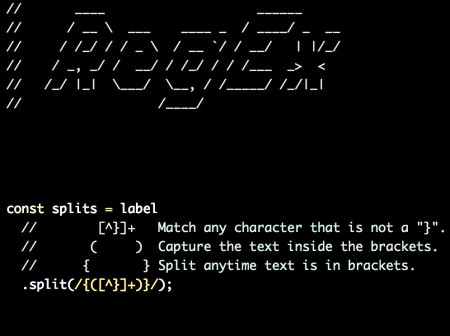
The following is a regex that I wrote to split out groups of matching curly braces, in order to replace this text with custom values. As is common, this feature started out fairly simple, and then grew more and more complicated.
I’ve struggled in the past with documenting regexes, and I was quite happy with this result. While this article does not demonstrate strict ASCII art, I think it’s still a valid example of using white space and unconventional formatting to increase the maintainability of code.
1 | const splits = label |
This quite nicely captures the idea of what the regex is doing. Here is another example from parsing a URL parameter for a range of times.
1 | const matches = committedRange |
I found another undocumented regex in the Firefox Profiler and tried out this technique. I had no idea what the regex did without plugging it into regexr.com and pondering over it. As a reviewer, it’s also really hard to double check the intent and correctness of a regex without proper documentation.
1 | const result = pathInZipFile |
Thanks to patorjk.com for the initial ASCII header text in my story’s graphic.